Hostinger Review 2026
1. Web Hosting (WordPress & More)
This is Hostinger’s bread and butter, and for good reason. Hostinger is officially recommended on the WordPress.org hosting page, making it a trusted choice for millions of users.
Plans & Pricing
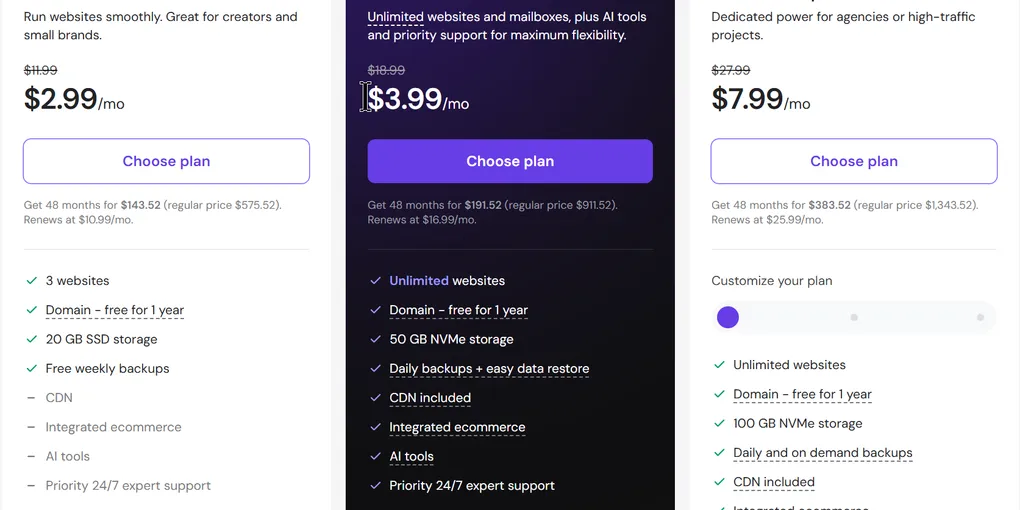
Hostinger offers three main shared hosting plans:
- Premium: The entry-level plan. It supports up to 3 websites, includes 20 GB SSD storage, and comes with a free SSL certificate and weekly backups. This is best for small sites and beginners.
- Business: The most popular option and the “sweet spot” for most users. It includes NVMe storage for faster speeds, daily backups, and supports up to 50 websites.
- Cloud Startup: Designed for higher traffic. It provides dedicated resources (more CPU and memory) for better performance and stability.
Pricing Structure: Hostinger’s prices are heavily discounted for longer commitments. The biggest savings come from choosing a 48-month plan.
- Promotional Price: A Business plan might cost around $3.99/month on a long-term contract.
- Renewal Price: The same plan renews at around $16.99/month.
User Experience (hPanel)
Instead of the standard cPanel, Hostinger uses its own custom dashboard called hPanel. It is modern, clean, and intuitive. You can manage domains, SSL certificates, backups, security, and emails all in one place. The only complaint is that it can occasionally be a little slow to load, but overall, it’s one of the easiest control panels to navigate.
Performance & Security
- Performance: Hostinger performs well, especially on the Business plan thanks to NVMe storage (which is up to 6x faster than standard SSDs) and LiteSpeed caching.
- Security: All plans include basic protection like free SSL certificates, DDoS protection, and automatic backups (weekly on Premium, daily on Business).
The Verdict on Web Hosting:
If you’re building a WordPress site or need a reliable, affordable home for a small business website or blog, Hostinger is definitely worth it.
2. Website Builder
If you want to avoid the technicalities of WordPress, Hostinger offers its own drag-and-drop website builder.
Key Features
- AI Builder: You can describe what you want, and Hostinger’s AI will generate a functioning website for you in minutes.
- Templates: If you don’t want to use AI, there are clean, professional templates available.
- Editor: The editor uses a grid-based system, similar to Squarespace, which gives you more freedom than many budget builders.
- Multi-Site Management: Unlike Wix or Squarespace, Hostinger allows you to build multiple websites under one plan (up to 100 on the Cloud plan).
E-commerce Limitations
While the builder includes basic e-commerce features, it is not recommended for serious online stores. For scaling a real e-commerce business, it’s better to use WordPress + WooCommerce or dedicated platforms like Shopify.
Bonus: Hostinger Horizons
This is Hostinger’s AI tool for building basic web apps. While it’s improving, it can still be “hit or miss.” Small edits can sometimes cause major issues. It’s best treated as an experimental tool rather than a primary development platform.
The Verdict on the Website Builder:
Excellent for informational sites, portfolios, and small business websites. Avoid it for complex e-commerce.
3. VPS Hosting (Virtual Private Server)
If you’ve outgrown shared hosting, or you need to run custom applications (like Docker containers or n8n automation), Hostinger offers managed VPS plans.
Plans & Specs
Hostinger VPS plans are divided into KVM tiers:
- KVM 1: 1 vCPU, 4 GB RAM, 50 GB NVMe, 4 TB bandwidth.
- KVM 2 (Most Popular): 2 vCPU, 8 GB RAM, 100 GB NVMe, 8 TB bandwidth.
- KVM 4 & KVM 8: Higher tiers for more demanding workloads.
Hardware includes modern AMD EPYC processors and a 1 Gbps network connection.
Beginner Friendly Setup
This is where Hostinger stands out. Most VPS providers sell you a server and leave you to configure it. Hostinger, however, offers templates that allow you to install an OS, control panel, or pre-configured apps (like n8n) with just a few clicks. This makes it one of the easiest VPS setups for beginners.
The Verdict on VPS:
If you are new to VPS or want an affordable, easy-to-manage server, Hostinger is a fantastic option.
4. Domains
- Registration: You can register a domain directly through Hostinger. It streamlines the process, especially if you already have hosting with them.
- Perks: Often, longer hosting plans include a free domain for the first year, plus free domain privacy protection.
- Pricing: You can find deals like a .com for $0.01 for the first year, but be aware that renewal rates will be higher.
The Verdict:
It’s convenient to buy your domain with your hosting (especially if it’s free). However, if you are buying a domain separately, it’s wise to shop around as pricing varies.
5. Business Email
Want a professional email address like you@yourdomain.com? Hostinger provides this.
- Plans: The Starter plan offers 1 mailbox (10 GB), while Premium offers 50 GB per mailbox.
- Usage: You can use their webmail or connect the inbox to Gmail, Outlook, or Apple Mail.
- Competitor: The main alternative is Google Workspace, which is more polished and includes Drive, Calendar, and Docs, but costs more.
The Verdict:
If you want a budget-friendly, all-in-one solution, use Hostinger’s email. If you want the full Google ecosystem, pay extra for Google Workspace.
6. Customer Support & Refund Policy
Refund Policy
Hostinger offers a 30-day money-back guarantee on most products (hosting, VPS). The main exception is domains, which typically have a 4-day refund window. The refund process is incredibly simple and can often be done directly from your billing dashboard.
Support
You’ll initially be greeted by “Kodee,” Hostinger’s AI assistant. For complex issues, it will route you to a real human agent. In most cases, support agents are available within minutes via live chat.
Final Verdict: Is Hostinger Worth It?
Yes, for most people.
Hostinger delivers exceptional value, especially for:
- WordPress Hosting: Affordable, fast, and easy to manage.
- Website Builders: Perfect for small businesses wanting a quick, professional site without coding.
- VPS Beginners: An accessible entry point into server management.
Where to Save Money
If you decide to go with Hostinger, don’t pay full price. Click the link to get an exclusive coupon code that will apply the best available discount (usually up to 20% off on your first plan).
Pros and Cons Summary
| Pros | Cons |
|---|---|
| Extremely affordable introductory prices. | High renewal rates (common in the industry). |
| Beginner-friendly hPanel dashboard. | The Website Builder is not ideal for large e-commerce sites. |
| Excellent WordPress integration and official recommendation. | Horizons (AI app builder) can still be buggy. |
| Easy VPS setup with pre-configured apps (unlike many competitors). | hPanel can sometimes lag. |
| 30-day money-back guarantee with easy refunds. | Short 4-day refund window for domains. |
Hostinger isn’t perfect, but it consistently hits the mark where it matters most: price, performance, and ease of use.